Available now
PromptDeck
Your mini apps and data conversations, together. Start with six built-in tools for invoices, printable quotes, clients and leads, bookings, inventory, and creating your own app. Keep the data you enter, change a tool in plain English, and export your work to Excel. Ask questions of a spreadsheet or database with the numbers behind each answer, or reuse a saved prompt for everyday writing and analysis. It can also wear your business rather than ours: put in your logo, name and contact details once and they head every tool you keep, so the invoice or quote you print goes out on your own letterhead.
Wondering how it works in practice? Read the setup & usage guide →
Before you start
A Claude or ChatGPT plan, or an AI model key
Already have Claude Pro or Max? Install Claude Code and connect your subscription in PromptDeck - no API key or separate API usage required. On ChatGPT Plus or Pro instead? Install OpenAI's Codex (the app or the CLI), sign in once, and PromptDeck runs on your ChatGPT plan the same way. You can also use an OpenRouter key for hundreds of pay-as-you-go models, an Anthropic API key, or any OpenAI- or Anthropic-compatible endpoint. Already running a LiteLLM gateway? Paste its address and PromptDeck uses the models you've put behind it.
Create an OpenRouter key →
What it does
- Six ready-made tools open in one click: an invoice tracker, a printable quote that totals itself, one list for clients and leads, a booking scheduler, an inventory tracker with reorder alerts, and a builder for anything they don't cover. Useful in the first minute, and yours to keep.
- Your tools remember: rows you enter stay between runs, and you change a tool just by describing the change, with edits to saved data shown as a diff before anything is written.
- Everything you track rolls up into running totals worked out on your own machine, and exports to Excel or as a standalone file that opens in any browser.
- Put your own business on your tools: add your logo, name and contact details once and they head every tool you keep - including the ones you built before - so a printed invoice or quote reaches your customer on your letterhead, not ours. Your brand colours come along too, onto the tools, the files you send out, and PromptDeck itself.
- Track clients and leads in one place: who they are, what stage they're at, what the pipeline is worth, and who you haven't followed up in over a month. A CRM you can actually change - add the field your business needs and it's there.
- Hand a tool or a prompt to a colleague as a single file - they see exactly what it does before importing, and it runs on their own key; your keys and data never travel with it. Or open the Gallery for apps other owners shared: every one is reviewed before it's listed, and free to download.
- Already have the data? Ask it questions instead of building something. Load a spreadsheet, an Excel workbook, a pasted range, a JSON file, a web link - or connect your own database - and ask in plain English: who spent the most last quarter, what's my average order value by month, which items are below their reorder point. The answer is worked out from your actual rows, with the exact numbers shown underneath it. Nothing gets built, and nothing is saved unless you decide to keep it.
- Put a saved app on a schedule: at a set time on the days you choose, every few hours, or whenever a new file lands in a folder. It runs on this computer while PromptDeck is open, and anything you mark “ask me before running” waits for your OK.
- One Run inbox shows what your apps did, are doing, and need you to decide - open any result, approve a run that's waiting, or decline it.
- Crews: give a goal to a team of your own saved apps. A coordinator splits it into assignments, each app works on its own model and knowledge, and any step that reaches outside the crew waits for your approval.
- Need a quick one-off instead? The same app runs prompts too - eighteen ready-made ones included - with typed fields, follow-ups, chained steps, and folder inputs that always use the newest file.
- Runs on the AI plan you already pay for, with no API key: Claude Pro or Max through Claude Code, or ChatGPT through OpenAI's Codex. Or use hundreds of models with an OpenRouter key, an Anthropic key, or any OpenAI- or Anthropic-compatible endpoint. If your team already runs a LiteLLM gateway, PromptDeck can point straight at it instead: one address, whichever models you've put behind it, and your existing keys and spend limits stay where they are.
Runs on
Disk space
About 85 MB to download - it's a portable app, so there's no installer: you just run it. Set aside roughly 300 MB for the app itself, plus your prompt apps, the tools you keep, and their saved data, which live in your user profile and grow slowly as you use it.
What you get on day one
Six tools, already built
You don’t start from a blank page. Open one, and it works in the first minute - then change anything about it by describing the change.
Invoice Tracker
Who owes what, when it's due, and what's been paid.
Running totals for outstanding, overdue and paid - and anything past its due date is flagged.
Printable Quote
A quote for your customer - the job, the line items, your terms.
Totals each line, the subtotal, tax and grand total as you edit, keeps past quotes, and prints a clean customer-facing copy or PDF.
Clients & Leads
Every client and lead in one list - stage, value and who needs chasing.
Totals the pipeline by stage and flags anyone past their follow-up date or not contacted in over 30 days.
Booking Scheduler
Appointments and bookings - who, when, and where.
Separates upcoming from past, highlights today, and warns you when two confirmed bookings overlap.
Inventory Tracker
Stock levels, what each item cost, and what to reorder.
Adjust quantities up or down; anything at or below its reorder point is marked “reorder now”.
Mini App Builder
For the tool nobody has built yet - describe it and keep it.
Turns a plain-English description, and your data if you have some, into a working app in the same window.
Each one runs on your machine, keeps its own rows and does its own arithmetic - no workspace, no seats to administer, nothing syncing to us. And because it’s yours, you can change it: ask for a field, a column or a different calculation, and the tool comes back with it.
Guided product preview
See PromptDeck in action
A 30-second tour built on actual PromptDeck 0.4.30 screens with sample data: the workspace, a quote from a built-in app, automations, the Run inbox and a crew. The quote's text is sample output, not a recording of a live model.
Explore the workflow
Actual app screens with sample data. Choose a step to take a closer look.
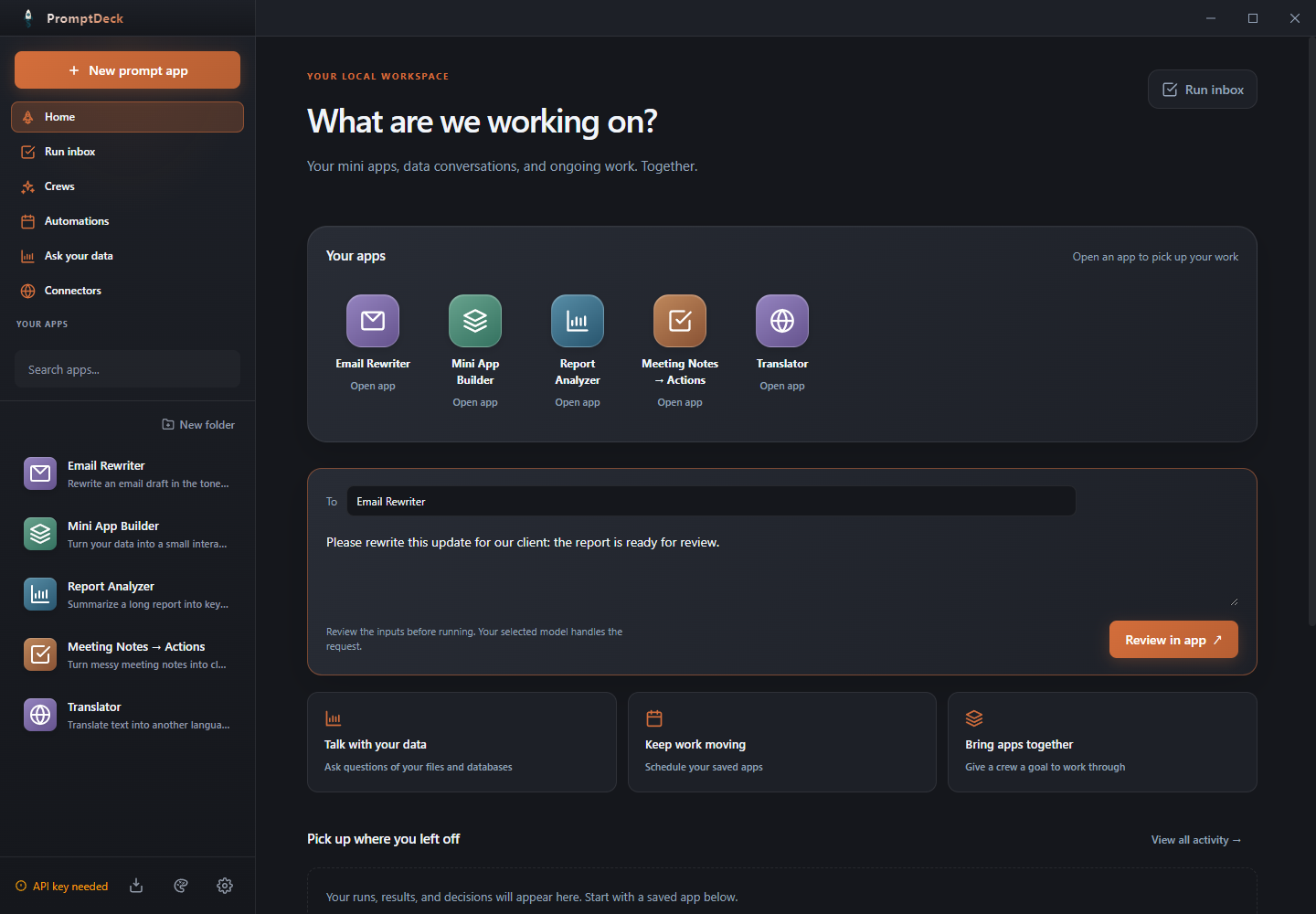
Your apps. One place.
Open saved tools from your workspace, or describe the next one you need.